Just the Recipe: Recipe Keeper
- 4.8
- Rating
- 50.00K
- Installs
- Free
- Price

 Analysis by App-foxy
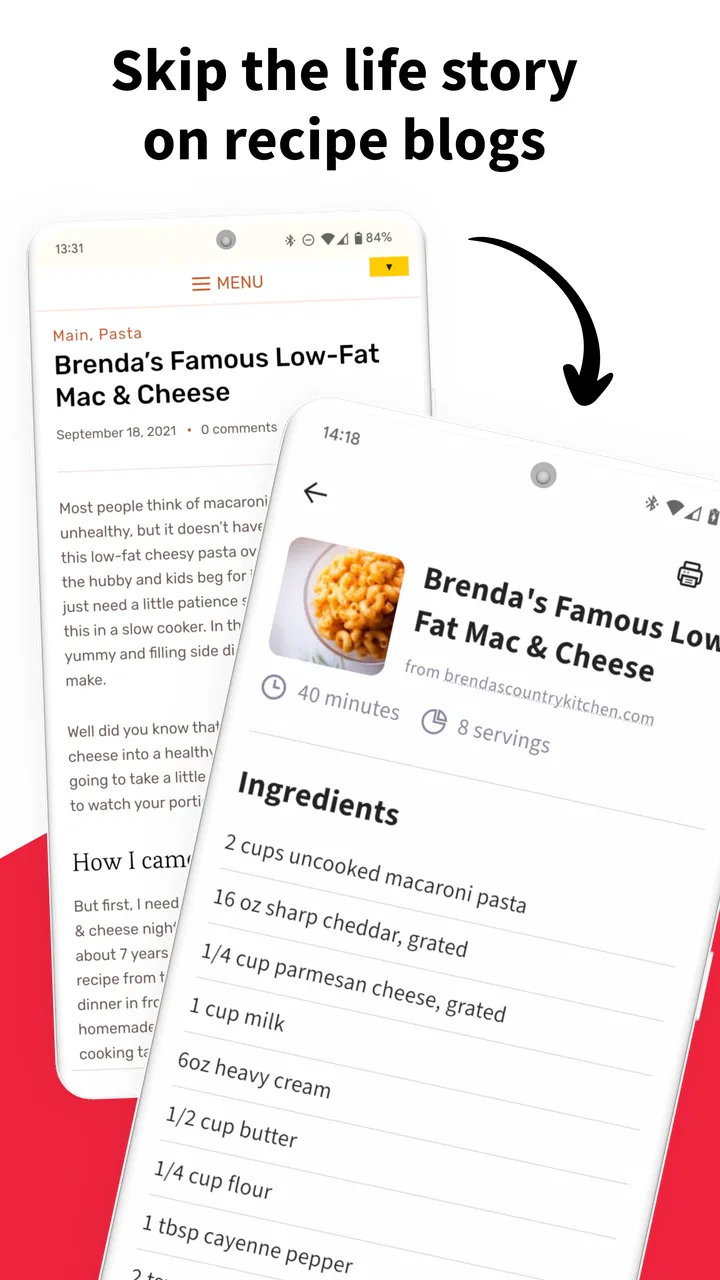
I like recipe apps that solve one annoying problem instead of trying to become an entire kitchen assistant. Just the Recipe: Recipe Keeper takes that approach by focusing on a simple task: turning an online recipe into something cleaner and easier to use. Its store summary describes the idea well, but the practical benefit is more specific than that. When I find a recipe buried under a long personal story, advertisements, and unrelated page elements, I can use the app as a way to get closer to the actual ingredients and instructions.
That makes it a Food & Drink app with a very focused purpose. It is free to download, suitable for Everyone, and developed by Streamliners. The app was released on February 22, 2022, and its current version is 1.6.6, working on Android 7.0 and later. Those details matter mainly because this is the kind of utility I expect to install quickly when I am already looking at a recipe, rather than something I want to study before cooking.
Why cleaning a recipe page matters more than it sounds
The central capability is link-based recipe cleanup. Instead of treating a recipe website as a page I must read from top to bottom, I can use a recipe link and get a more direct cooking view. That distinction changes the experience in the kitchen. A conventional browser leaves me scrolling past introductions, photographs, navigation bars, comments, and other material before I reach the part I actually need. A recipe-focused tool reduces that interruption.
You May Also Like

 AccuWeather: Weather Radar
AccuWeather Review: A Quick, Clear Forecast for Everyday Decisions
For everyday plans, the best forecast is the one you can understand quickly. AccuWeather makes rain timing, radar, and local conditions easy to act on, with a few trade-offs.

 Hill Climb Racing
Why Hill Climb Racing Still Turns Crashes Into One More Run
A tiny car, a bumpy hill and one more upgrade: Hill Climb Racing keeps resurfacing because its simple chaos makes every near-miss feel personal.

 AliExpress - Shopping App
AliExpress Makes Global Shopping Feel Personal, but Shoppers Bear the Risk
AliExpress turns a global marketplace into a pocket-sized discovery engine. Its reach is useful, its shopping loop compelling, and its trade-offs easy to miss.

 Lords Mobile: Kingdom Wars
Lords Mobile Is a Kingdom-Building Routine, Not a Quick Match
A case-by-case verdict on the building, battles, device demands, and social commitments that make Lords Mobile rewarding for some players and exhausting for others.

 PDF Scanner app - TapScanner
TapScanner Makes Paperwork Easier to Capture, Check, and Share
TapScanner makes scanning with a phone feel less like a rescue operation and more like a dependable step in getting work done. Its capture tools are useful, though not flawless.

 Block Blast!
 Shows How Much a Puzzle Game Can Leave Out
A quiet grid game shows why puzzle players increasingly value instant clarity, repeatable skill and low-pressure play—and where the genre still needs to catch up.
More From Our News Desk
View All News


In my experience, the value is not that the app makes cooking magically easier. It is that it removes small sources of friction at exactly the wrong time. When my hands are busy, I do not want to search through a page for whether the next step says to simmer or bake, or whether the ingredient list continues below an image. A cleaner presentation gives me a better chance of staying with the recipe instead of losing my place.
The best way to think about it is as a bridge between the open web and a usable cooking reference. It does not ask me to abandon the recipes I already discover through search, social posts, or messages. I can continue finding recipes wherever I normally find them, then use the app when the original page is too cluttered. The real advantage is fewer distractions between finding a recipe and following it.
This focus also explains why the app can feel more useful than a large recipe platform in certain situations. Many cooking services want me to browse their own collections, create an account, follow creators, or build a meal plan. Those features can be valuable, but they also add another layer between me and tonight’s dinner. Recipe Keeper is more appealing when I already have a link and simply want to make it readable.
What happens when I use a recipe link
The workflow is straightforward in concept. I start with a recipe page, provide its link to the app, and let it turn that source into a cleaner recipe view. The important habit is to treat the link as the input, not the app’s own catalog as the starting point. That makes it especially convenient for recipes shared in a group chat, saved in a browser, or discovered while searching for a particular dish.
I would use it in two stages. First, I find the recipe and quickly check that it is the one I want. Then I pass the link into the app before I begin gathering ingredients. This avoids the common mistake of opening a recipe while cooking and only later discovering that the page is difficult to navigate on a small screen. The cleanup step is most useful before the preparation becomes messy.
A practical tip is to test the recipe link while I still have time to correct a problem. Web pages are not all built in the same way, and a tool that extracts recipe information depends on the source being structured clearly enough for the app to understand. If the result looks incomplete or confusing, I would return to the original page rather than blindly trusting a shortened view. That is not a reason to dismiss the app; it is a reminder that recipe extraction is a convenience layer, not a substitute for checking the source.
I also find it useful to compare the cleaned version with the original once, especially for a recipe I have never cooked. The original page may contain context about substitutions, resting time, pan size, or a preparation detail that does not appear in the main ingredient-and-instruction flow. After I understand how a particular source behaves, I can use the cleaner view more confidently for later cooking.
That small verification habit is one of the most important trade-offs. The app’s strength comes from simplifying the page, but simplification means I should pay attention to what has been retained. For a familiar weeknight meal, that extra check takes little effort. For baking, preserving, or a recipe with several timing dependencies, I would be more careful because a minor omitted detail can affect the result.
A realistic weeknight use case
Imagine I am leaving work and a friend sends me a link to a one-pot pasta recipe. I open it on my phone and immediately see the usual long page: a personal introduction, several photographs, advertising sections, and a recipe card farther down. I could use the browser, but I know I will be scrolling with one hand while trying to measure ingredients with the other. This is where I would send the link to Recipe Keeper.
Once the recipe is presented in a cleaner form, I can review the ingredient list before shopping. I can check whether I already have the stock, pasta, tomatoes, and seasoning, then use the same recipe view when I start cooking. The benefit is not a new cooking technique. It is continuity: the recipe I found, the recipe I checked, and the recipe I follow are easier to treat as one reference instead of three different parts of a noisy webpage.
There is another useful scenario for people who save recipes impulsively. I often discover a promising dish when I am not ready to cook it. A link saved in a browser can later be difficult to revisit because the page is crowded or the site changes its layout. Passing a useful recipe through a cleaner workflow can make it more practical when the time finally comes to use it. I would still keep the original link somewhere, but the cleaned presentation can become the version I actually want in front of me.
It can also help when cooking from a phone in a compact kitchen. A large monitor or printed page is easier to read, but not everyone has either available. On a phone, every unnecessary swipe matters. A focused recipe view reduces the chance that I will tap an unrelated element, lose my position, or accidentally wander away from the instructions.
Where it beats ordinary browsing, and where it does not
Compared with a normal browser, the app wins when the recipe website is overloaded. The browser remains better for discovering related recipes, reading comments, checking the author’s notes, or viewing the full context around a dish. I would not replace the browser entirely. I would use the browser for research and Recipe Keeper for the cooking phase.
Compared with a full recipe-management service, this app is more direct but less ambitious. A larger service may be preferable if I want extensive organization, meal planning, shopping-list tools, social discovery, or a broad built-in collection. Recipe Keeper makes more sense when I do not want to migrate my cooking life into another platform. Its narrow purpose is a benefit for a link-first workflow, but it may feel limited to someone looking for an all-in-one kitchen system.
There is also a difference between cleaning a recipe and understanding it. A neat ingredient list cannot tell me whether my pan is too small, whether a sauce has reduced enough, or whether a particular substitution will change the texture. The app can improve access to instructions, but it does not replace cooking judgment. I still need to read carefully and adapt to my equipment and ingredients.
Another limitation is that the app’s usefulness depends on the recipe source. If I am working from a scanned cookbook page, a handwritten note, or a recipe that is not available through a usable link, this particular workflow is less relevant. In those cases, a note-taking app, a camera scanner, or a dedicated manual recipe organizer may be the better choice. I would not install this expecting it to solve every way recipes can reach me.
The free price makes experimenting easy, but the app includes in-app purchases ranging from $0.99 to $59.99 per item. I would approach those purchases according to how often I use the app and what extra value they provide in my own workflow. A casual user can start without paying, while a frequent cook should look at the available purchase options before building a long-term routine around features that may require payment.
Small habits that make the workflow better
My first tip is to clean a recipe before shopping, not only when the pan is already heating. That gives me time to notice unusual ingredients, unclear quantities, or missing preparation steps. It also separates two jobs that are easy to mix up: deciding whether I want to cook something and following it accurately.
My second tip is to keep the original page available for recipes with important background notes. This is particularly useful for bread, desserts, marinades, and dishes where timing or texture is explained outside the formal instructions. I prefer the cleaned view for speed, but I use the full page when the author’s explanation affects technique.
My third tip is to use the app as a filter for recipe quality, not as proof of quality. A clean layout can make a weak recipe look more approachable, so I still check the ingredient balance, cooking time, and instructions before committing. The app improves presentation; it does not independently validate whether the recipe is sensible.
A fourth useful habit is to prepare the phone before beginning. I would open the recipe, confirm the full ingredient list, and place the device where I can read it without repeatedly touching it. This sounds basic, but it turns the app from a link converter into a reliable part of the cooking sequence. The less I handle the phone during preparation, the more useful the simplified view becomes.
Who will get the most from it
I think this app is best for people who regularly cook from recipes found across the web and dislike the reading experience on recipe sites. It is also a good fit for busy home cooks who want to move quickly from a shared link to a workable set of instructions. If I already have a large collection of online recipes but no interest in joining another cooking community, the focused approach is appealing.
It is especially suitable for newer cooks who can follow written instructions but find long webpages distracting. The cleaner presentation does not teach fundamentals, yet it can make the first attempt less intimidating by putting the practical information closer together. That can be valuable when I am already concentrating on measuring, chopping, and timing.
I would be less enthusiastic for someone who mainly cooks from printed books, handwritten family recipes, or video tutorials. I would also choose a more comprehensive organizer if I needed a dependable archive with extensive categorization and planning tools. The app’s purpose is strongest when the starting point is a recipe link and the immediate goal is readable instructions.
Streamliners has kept the concept clear enough that the app has attracted a 4.8 average from around 2.6 thousand ratings, with over 50 thousand installs. Those figures suggest that the focused idea resonates with many users, although popularity does not remove the need to check whether my own recipe sources work well with it. The Everyone rating also makes it an uncomplicated choice for a household device shared by different age groups.
My final take on the focused approach
After using it as a link-to-cooking tool, I see Recipe Keeper as a practical companion rather than a complete recipe ecosystem. Its best moment is the few minutes between discovering a recipe and starting to cook, when a cluttered webpage can become a genuine nuisance. By giving that recipe a cleaner place to live, it helps me spend more attention on the food and less on navigating the page.
I would recommend it to a friend who says, “I have plenty of recipes, but I hate using them on my phone.” I would explain the limitation too: check important details against the original, and do not expect a link cleaner to replace a full organizer, cookbook, or cooking teacher. For the right workflow, that narrowness is exactly why it works.
My honest recommendation is to try the free version with the recipe sources you already use. If it consistently turns those pages into clearer cooking references, it earns a place in a daily kitchen routine. If most of your recipes come from offline material or you need deep meal planning, another category of app will serve you better. For web-based home cooking, though, this is a refreshingly focused solution that addresses a problem I encounter often and solves it without making the process feel heavier.
FAQs for Just the Recipe: Recipe Keeper
01What is Just the Recipe: Recipe Keeper?
Just the Recipe: Recipe Keeper is a recipe organization app designed to help you save, manage, and revisit your favorite recipes in one convenient place. It can be useful for collecting recipes from different sources, keeping cooking notes, and organizing meals more efficiently. Instead of searching through bookmarks, screenshots, or social media posts, you can use the app as a personal digital cookbook for everyday cooking.
02Can I import recipes from websites or online sources?
One of the main reasons to use Just the Recipe: Recipe Keeper is to make saving online recipes more convenient. Depending on the version and supported website, you may be able to import recipe information or save content for later reference. However, compatibility can vary between websites, especially when pages use unusual layouts, advertisements, or restricted access. It is worth checking the app’s supported features before relying on it for every recipe source.
03Can I organize recipes into categories or collections?
Yes, the app is intended to make a growing recipe library easier to manage. Users can generally organize recipes by categories, meal types, ingredients, personal collections, or other labels that match their cooking habits. This is particularly helpful when you have separate groups for quick dinners, baking, vegetarian meals, desserts, or holiday dishes. Good organization makes finding a saved recipe much faster than searching manually.
04Does Just the Recipe: Recipe Keeper work offline?
Offline availability depends on how the recipe was saved and which features are included in the current app version. Recipes stored locally on your device may remain accessible without an internet connection, which is useful when cooking in a kitchen with weak Wi-Fi. Online imports, synchronization, account features, or external recipe pages may still require internet access. Test your saved recipes offline before depending on the app while traveling.
05Is Just the Recipe: Recipe Keeper free to use?
The app may offer free access to its basic recipe-saving and organization tools, while some advanced features can depend on in-app purchases, subscriptions, or platform-specific limits. Before downloading, review the current store listing for details about pricing, advertisements, synchronization, export options, and premium functions. Also check whether your preferred features, such as unlimited recipe storage or backup, are included in the free version.
Pros
- Imports recipes from supported websites in just a few taps.
- Keeps ingredients and cooking steps organized in a clean layout.
- Useful search tools make saved recipes easy to find later.
- Helps reduce distractions by focusing on the recipe itself.
- Works well for building a personal collection of favorite dishes.
Cons
- Website compatibility may vary when importing less common recipes.
- Some advanced features may require a paid upgrade.
- Limited social tools for sharing or discovering recipes from others.
- Imported recipes may need manual editing to fix formatting.
- Offline access can depend on how recipes were previously saved.

Just the Recipe: Recipe Keeper
Gallery